GridSim Features
A rich, immersive power grid simulation built with modern web technology. Explore the features that make GridSim a unique strategy game.
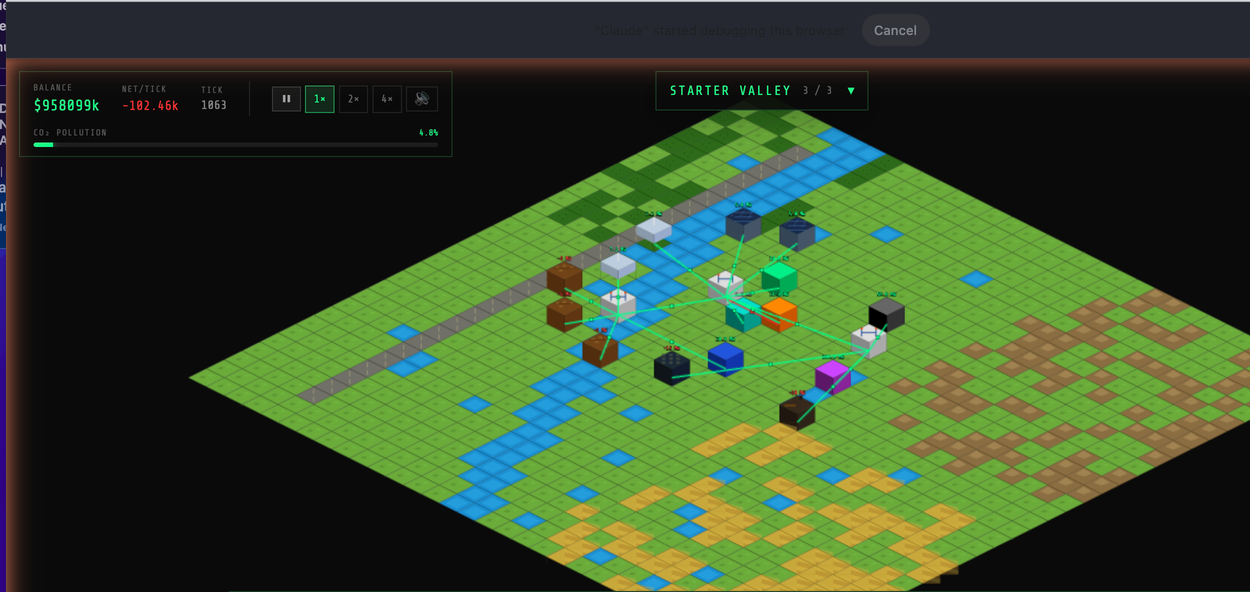
Isometric Field View
Build your power grid on an intuitive isometric tile map inspired by classic Civilization II and Sim Theme Park aesthetics. Each tile can host generation assets, substations, loads, or transmission infrastructure.
Key Features:
- 32×32 tile grid with zoom and pan for detailed or overview perspectives
- Color-coded assets: Green for solar, cyan for wind, gray for coal, orange for gas, blue for hydro, purple for nuclear
- Real-time weather overlay: Visual indicators for clear, cloudy, rain, and storm conditions
- Transmission line visualization: Glowing lines show power flow direction and loading status (green/yellow/red)
- Build toolbar: Quick-access buttons for all asset types, organized by category (generators, loads, grid devices)
- Asset info panel: Click any asset to see status, output, revenue, operational metrics
SCADA Control Room
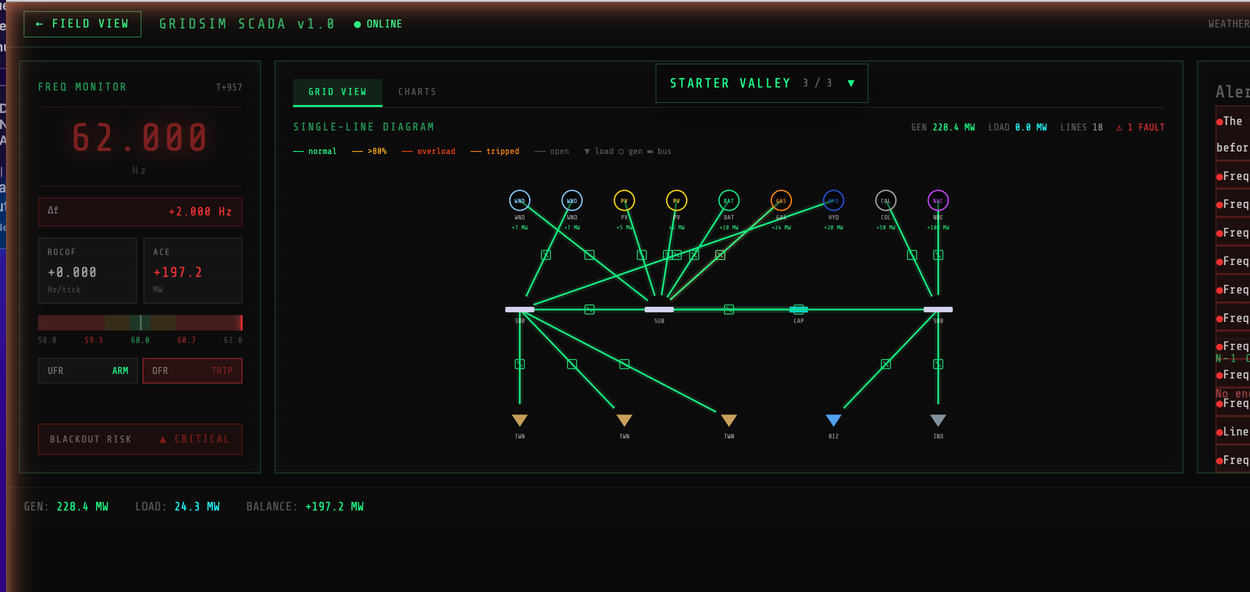
Switch to the command center. A dark, gritty utility SCADA control room with real-time monitoring, digital readouts, and trending charts. Made for serious grid operators who want full visibility and control.
Key Features:
- Frequency Clock: 36pt monospace readout showing grid frequency to 3 decimal places. Color changes: green (healthy), yellow (warning), red (critical)
- ROCOF Monitor: Rate of Change of Frequency (Hz/tick) helps you predict frequency trends
- ACE Indicator: Area Control Error (MW) shows power balance at a glance
- Frequency gauge bar: Visual representation of 58–62 Hz range with zone colors (red/amber/green/amber/red)
- Relay status (UFR/OFR): Under-Frequency and Over-Frequency Relay indicators show TRIP/ARM states
- Blackout risk footer: LOW / ELEVATED / HIGH / CRITICAL with animated alert on critical conditions
Power Flow Visualization
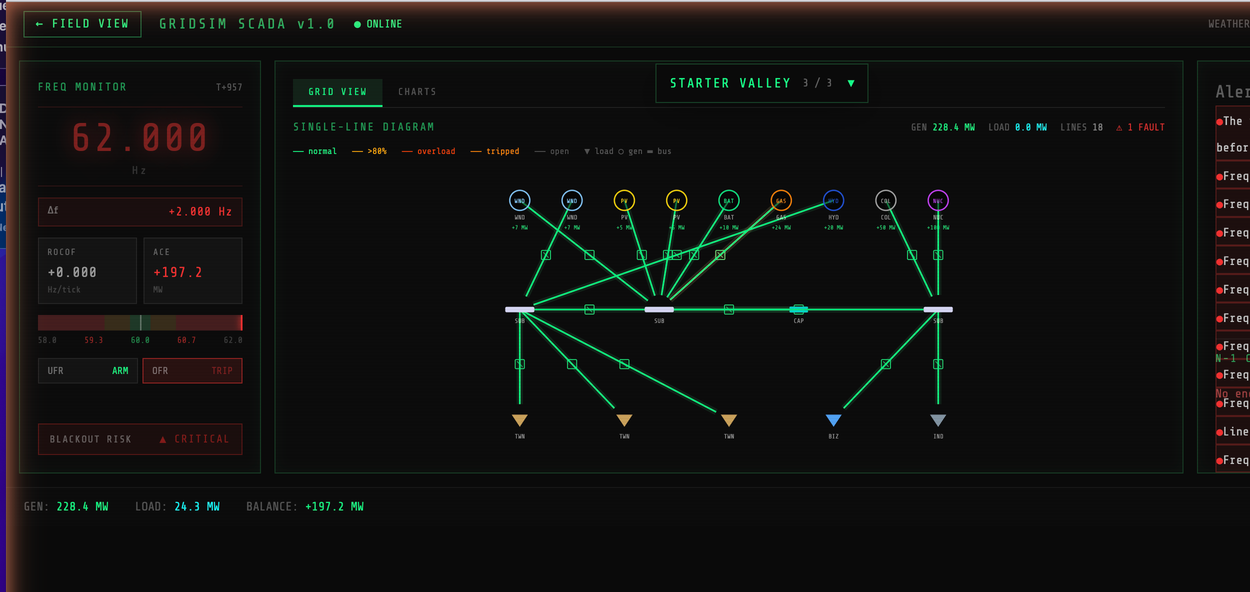
The SCADA overlay includes an SVG-based single-line diagram showing your grid topology in real-time. Animated power flow dashes move along energized lines, and color coding indicates loading status.
Key Features:
- Live power flow: Animated dashes show direction and magnitude of power flow on each line
- Line loading colors: Green (<80%), amber (80–100%), red (overload >100%), gray (tripped)
- IEEE/IEC symbols: Bus bars (substations), circles with type codes (generators), triangles (loads), capacitor symbols (cap banks)
- Breaker symbols: Diagonal cross marks open breakers; circuit protection shown at midpoints
- Line labels: MW flow and line rating displayed for reference (e.g., "45.3 / 100 MW")
- Hierarchical layout: Generators on top, substations/devices in middle, loads on bottom for clarity
Dynamic Weather & Emergencies
The grid is at the mercy of nature. Weather states affect renewable generation, and storms trigger transmission line faults. Dispatch your repair crews to restore service and manage the crisis.
Key Features:
- Four weather states: Clear (100% gen), Cloudy (90%), Rain (70%), Storm (40% + faults)
- Weather cycles: Realistic progression over 60–120 ticks per state change
- Random line faults: During storm, transmission lines have a chance to fail due to weather stress
- Truck dispatch system: 3 repair trucks with idle/in-transit/repairing states
- ETA estimation: Pathfinding calculates travel time to faulted line location
- Red alert status: System triggers visual and audio alerts when frequency critical or lines down
- Emergency flicker effect: Screen flashes red when frequency <59.5 or >60.5 Hz for immersion
Economy & Revenue Management
Balance your budget in real-time. Revenue from served loads flows in. Operating expenses drain your balance every tick. Manage cash flow carefully to fund expansions and handle crises.
Key Features:
- Tick-based economy: Updates ~2 times per second (configurable tick interval)
- Revenue: Connected loads tick down; disconnected loads earn zero
- Operating expenses: Coal ($15k/tick), Gas ($10k/tick), Hydro ($3k/tick), Nuclear ($30k/tick)
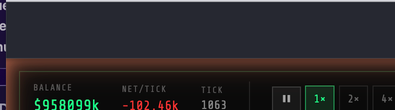
- Real-time balance display: Top-left HUD shows current balance, net revenue per tick, and tick counter
- Bankruptcy penalty: If balance drops below zero, you lose the scenario (can sell assets to recover)
- Game speed control: 1×, 2×, or 4× simulation speed to accelerate or slow time
- Pause mode: Freeze the simulation to plan or react to events
Save & Load System
Your progress is automatically saved every 10 ticks to your browser's localStorage. Close the game and return later to pick up where you left off.
Key Features:
- Auto-save: Game state persisted to localStorage every 10 game ticks
- Scenario resumption: Saved game shows scenario name and last save timestamp
- Continue button: Instantly restore the exact grid state, balance, and progression
- Discard option: Clear save to start fresh without reloading
- Terrain generation: Map is generated once at startup; save captures asset placement, not terrain
- Cross-session persistence: Works across browser sessions (survives closing and reopening tab)
Save / Load / Resume
Immersive Audio Design
Synthesized, procedural audio powered by the Web Audio API. No pre-recorded samples — every sound is generated in real-time based on grid state, creating an immersive operator experience.
Key Features:
- Transformer hum: 120 Hz sawtooth fundamental + 240 Hz harmonic, filtered for a rounded buzz. Pitch and volume track grid frequency and imbalance
- Frequency alarm: Alternating 880/660 Hz square wave when frequency out of bounds. Different pitches for info/warning/critical
- Fault sound: White noise crackle with exponential decay, high-pass filtered for realism
- Mute control: 🔊/🔇 button in HUD to toggle all audio
- Frequency modulation: Audio pitch changes with grid state; gain (volume) swells with deviation from 60 Hz
- No latency: Pure synthesis means zero audio buffer lag — immediate response to grid changes
Web Audio Synthesis
Cross-Platform Play
GridSim is a web-first game. Play on desktop for the full SCADA experience, or on mobile for a more compact interface.
🖥️ Desktop
- Full SCADA dashboard visible
- Side-by-side field + SCADA views
- Mouse and keyboard controls
- Optimal for long gameplay sessions
📱 Mobile/Tablet
- Touch-optimized build buttons
- Vertical layout for phones
- Responsive SCADA overlays
- Swipe to pan; pinch to zoom
Performance & Accessibility
⚡ Performance
- 60 FPS gameplay: Smooth animations and interactions
- Efficient rendering: Ground tiles cached to RenderTexture; assets and lines redrawn each frame
- Optimized physics: Simplified power flow (no DC load flow), fast frequency calculations
- Storage-efficient saves: ~50 KB per save file
- No external APIs: Fully offline capable after first load
♿ Accessibility
- Keyboard navigation: All actions accessible via hotkeys (P, F, S, 1–4, ESC)
- Color + text labels: Assets and statuses use both color and text
- High contrast: SCADA dark theme with neon accents on dark background
- Screen reader support: Semantic HTML for essential UI elements
- Colorblind modes: Planned for future release
GridSim vs. Other Grid Games
| Feature | GridSim | Typical Sim | Typical RTS |
|---|---|---|---|
| Isometric View | ✓ Full 3D-like perspective | ✓ Orthogonal 2D | ✓ Isometric/top-down |
| Real-Time Frequency | ✓ Yes (core mechanic) | — Absent | — Absent |
| SCADA Overlay | ✓ Yes (utility operator) | — No | — No |
| Weather System | ✓ Affects generation | ~ Visual only | ✓ Affects units |
| Audio Design | ✓ Synthesized immersion | ~ Background music | ✓ Unit/sfx sounds |
| Economic Model | ✓ Utility-focused | ✓ City/resource focused | ✓ War economy |
| Campaign + Sandbox | ✓ 3 scenarios + free play | ✓ Rich campaign | ✓ Campaign + skirmish |